While current developments in AI tend to get larger and larger, one might easily get the impression that modern AI applications strictly require the latest high-end hardware to run efficiently. In practice, however, raw hardware power alone is only one part of the equation. Whether an AI application runs well in a real-world setting depends just as much on how well the model and its implementation are adapted to the target hardware. With the right optimization strategies, the same model can show noticeably different performance characteristics on the same device.
To show the potential of such model optimizations, their impact, and how they work “under the hood”, this blog post makes use of a real-world example: a camera-based, real-time heartbeat estimation.
Making Model Optimization Tangible: A Live Demonstrator
To make the rather abstract optimization concepts visible, we built an interactive live demonstrator. Keep in mind that this is primarily a technical showcase rather than a finished product.
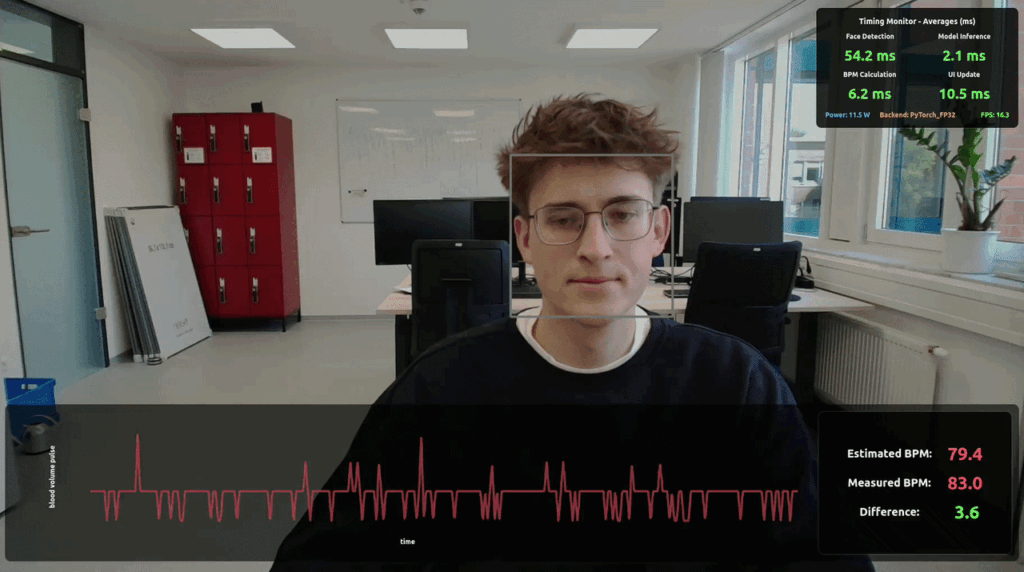
The demonstrator itself is simple: a user sits in front of a regular webcam while an AI model detects their face to extract subtle changes in skin coloration, caused by blood flow beneath the skin. Although these changes are invisible to the human eye, they are measurable via camera. Based on these signals, the system estimates the pulse of the user.
While real-time camera-based pulse estimation serves as a demonstrator for the impact of model optimization in this article, it is an exciting research field in its own right, with applications in intensive care, health monitoring, and fitness. Instead of requiring additional body-worn sensors, the pulse can be estimated from a regular camera stream, enabling continuous and contactless monitoring.
To showcase the impact of model optimization, the demonstrator features a Timing Monitor. This dashboard tracks performance statistics, including overall power consumption, frames per second (FPS), and the latency of face detection as well as model inference. Latency is especially important for real-time applications, as incorrect estimations could lead to harmful decisions. In our concrete case: If latency becomes too high, the system may rely on outdated camera frames, increasing the risk of estimating the wrong pulse.
The facial analysis in this demonstrator is powered by the same model through the entire process. However, the demonstrator allows the user to seamlessly switch the execution environment, typically called Backend, which executes the model.
What are Inference Backends?
Before diving into specifics, we should first describe what an inference backend actually is. In our context, a backend (sometimes also called an inference engine) is the software layer bridging between the AI model and the physical hardware.
While the AI model itself is described as a mathematical blueprint of the required calculations, the backend maps these calculations to the actual hardware instructions. This includes scheduling the operations on the central processing unit (CPU) and the graphics processing unit (GPU) and allocating the required memory. Essentially, the blueprint tells what needs to be done, and the backend tells the hardware how to execute these tasks.
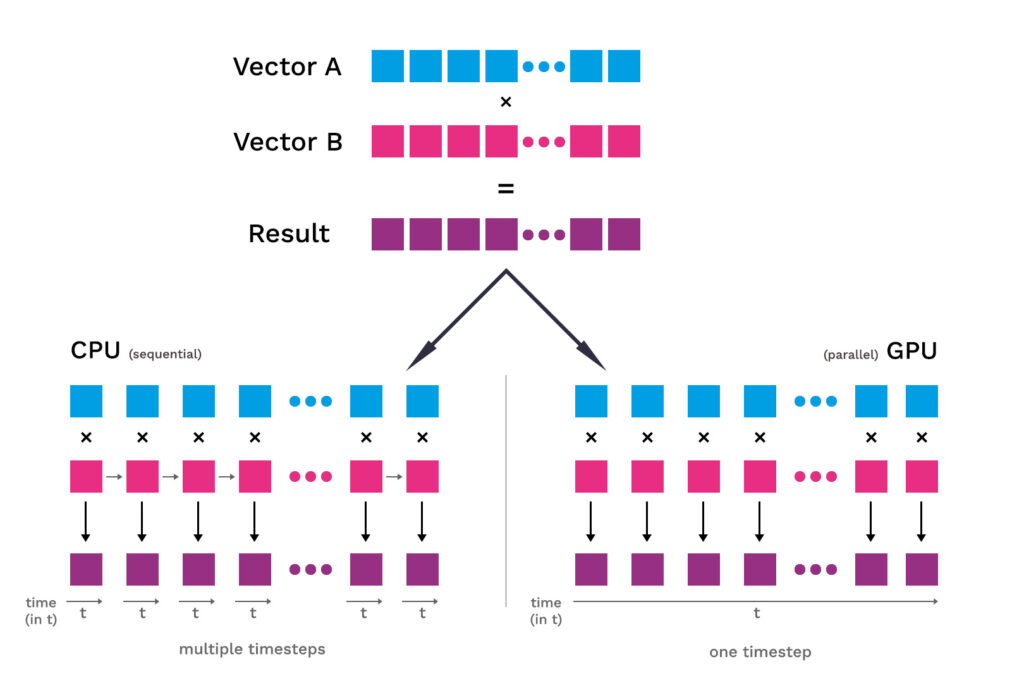
One illustrative example is element-wise vector multiplication. This is a fundamental operation that appears frequently in Machine Learning workloads. Although the mathematical operation itself is always the same, the way it is executed depends heavily on the underlying hardware. On a CPU, vector multiplication is typically performed by a small number of very powerful cores. On a GPU, in contrast, the same operation can be distributed across a very large number of simpler processing units, enabling many elements of the result vector to be computed in parallel. As a result, CPUs are generally better suited for smaller or sequential tasks, whereas GPUs are well suited for large, highly parallel workloads such as vector operations. So depending on the specific use case, the choice of hardware can have a major impact on how efficiently the same mathematical operation is executed.
Depending on the hardware used, switching between backends impacts the hardware utilization and therefore the usability of the demonstrator. In our demonstrator, we integrated three different backends:
- PyTorch: Typically known for training deep learning models, but now also supports more efficient model deployment on GPUs.
- ONNX Runtime: A standardized inference framework that focuses on graph-level optimization and efficient execution across different platforms.
- TensorRT: An inference backend specialized in hardware-aware optimization, particularly for NVIDIA GPUs.
Specialized backends for AI model optimization
The statistics in the Timing Monitor show the measured impact of the optimizations on the hardware. This also makes the impacts of the optimization comparable. Although all three backends run the same model and use the same hardware, they still behave differently. The reason is that a model does not directly tell the GPU every single low-level step it has to perform. Instead, the backend acts like a translator between the model and the hardware. The translation produces the same result but doesn’t translate the model in the exact same way into machine-readable code. The same model can be executed through different sequences of operations, different memory layouts, and different GPU functions. Some backends keep this process more general and flexible, while others are more specialized for execution on a specific hardware platform.
For example, a model often consists of many smaller operations that are executed one after another. A general backend may run these operations as separate steps. A more specialized backend may detect that some of these steps always occur together and combines them internally to avoid unnecessary movement of intermediate results through memory. This makes the computation more efficient, while the mathematical result is still the same.
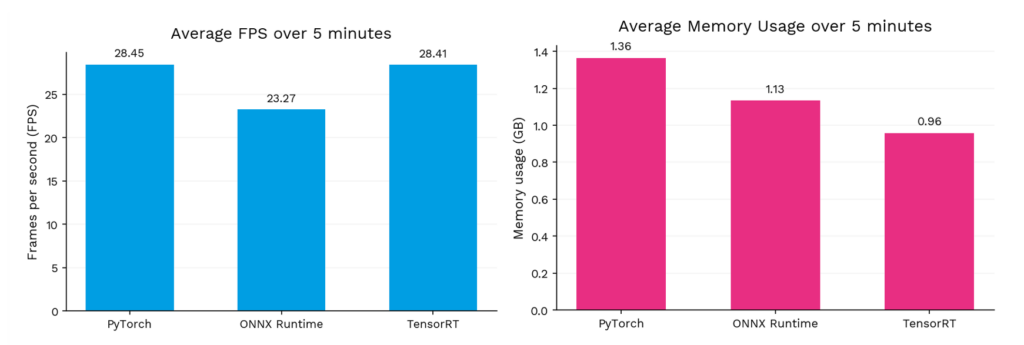
These differences become visible in the Timing Monitor of the demonstrator. To quantify the πimpact, we measured the average FPS and average memory usage over a five-minute runtime for each backend.
Comparing AI model Optimization across Backends
Compared to PyTorch, ONNX Runtime reduces the average memory usage from 1.36 GB to 1.13 GB. However, in our demonstrator, this comes together with a lower average throughout of 23.27 FPS compared to 28.45 FPS with PyTorch. This suggests that reducing memory usage alone is not enough to improve the full real-time property of the demonstrator. Depending on how the backend executes the model, lower memory usage can still come with less favorable execution choices for this specific setup.
The usage of TensorRT reduces the average memory usage even further to 0.96 GB, while still reaching almost identical FPS to PyTorch. Since the demonstrator runs on an NVIDIA Jetson AGX Orin, TensorRT can make stronger assumptions about the available hardware and use optimizations specifically designed for this platform. In this setup, this allows TensorRT to combine the lowest memory usage with nearly the highest FPS.
It is important to note that these measurements describe the full demonstrator pipeline rather than isolated model inference. They also include components such as face detection, BPM calculation, heart rate estimation, UI updates, and the Timing Monitor itself. Since these components were kept fixed during all measurements, the differences between the backends are still visible within the complete application context. However, the isolated effect on model inference may be even stronger than the end-to-end measurements suggest, because parts of the measured runtime and memory usage are shared across all backends.
The Importance of Execution Strategies for AI Models
The demonstrator shows that the performance of an AI application is not fixed once the model and hardware are chosen. Even without changing the model architecture or the device, the way the model is executed can noticeably change the behavior of the system.
This brings us back to the initial point: Modern AI performance is not only a question of using stronger hardware or larger models, but also of utilizing the available hardware in the best way possible. In our case, the backend comparison made it visible that the same heartbeat estimation model behaved differently depending on how it was executed on the target device. This is especially relevant for real-time applications. If latency becomes too high, the system may react to outdated input data, which can directly affect the reliability of the estimated result. In more critical real-world scenarios, such reliability issues could have serious consequences and, in the worst case, may even harm people.
Therefore, optimization should not be seen as a final polishing step after a model has been developed. Instead, it is an essential part of bringing AI applications onto real hardware. The demonstrator illustrates this on a small scale: the model stayed the same, the hardware stayed the same, but the execution strategy determined how usable and reliable the system became.